
The CPM User Guide is a comprehensive guide that includes “need to know” information about the administration of CPM in pre-K classrooms.
Visit the Circle Progress Monitoring (CPM) Toolkit! This online toolkit has been curated to meet the needs of those working in pre-K settings, and who support a variety of educators and leaders within their regions. This “one stop shop” offers pre-K programs the ability to locate a variety of materials and resources, each tailored to support understanding and implementation of CPM.
Getting Started
CPM Overview
Circle Progress Monitoring (CPM) was developed by the Children’s Learning Institute at The University of Texas Health Science Center at Houston. CPM is designed to provide teachers with immediate feedback that shows children’s progress in skill areas critical to school readiness. Teachers use information from CPM to inform instructional decision-making for small group and individual lesson planning.
As part of the Children’s Learning Institute’s ongoing efforts to evaluate the performance of the CPM, additional items may be piloted and included in some measures during the school year. These items will be identified for teachers as a “pilot item” and are not included in the student’s score. If you’re looking for something not answered in this user guide, review CPM frequently asked questions or contact our support team.
Benchmarks
Benchmarks are the minimum performance levels students are expected to reach by certain points of the year to indicate skill understanding. The CPM Benchmark table displays the cut scores for benchmarks and is helpful in analyzing your data.
Each progress monitoring measure yields a separate score. Some items are parent measures that are broken into sub-measure(s) (e.g., social and emotional). A total score is calculated from the separate sub-measure(s) scores. A total score is an additive number derived from the accumulation of sub-measure(s) scores. Keep in mind, if a sub-measure is missing, then the total score will not be calculated, and users will see a dash as a total score.
Understanding Benchmarks on CPM Reports
If a benchmark exists for the child’s age range, the shade of color presented on reports indicates if it is a formal benchmark (dark shade) or informal benchmark (light shade). Colors in the assessment indicate the level of support needed for 3 to 4-year-old children.
CPM benchmarks are dichotomous: Proficient or Not-proficient. The “Not-proficient” category includes “Monitor” and “Needs Support,” depending on the age group. Monitor was set as an indicator for those students under the age of 4 years who have an additional year in pre-K to reach proficiency.
CPM Benchmark Legend on CLI Engage
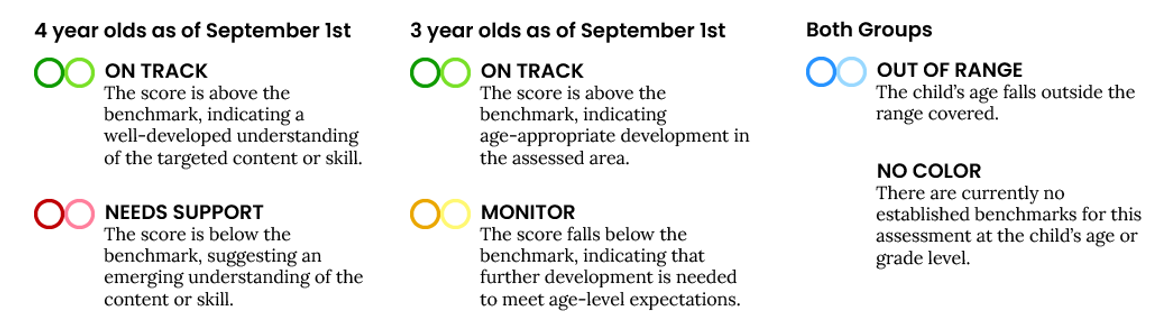
In the CPM benchmarks, the tables display the benchmarks for each measure listed by child age and then if they are considered to be at or meeting the benchmark. For example, the Rapid Letter Naming benchmark for a child who starts the school year at age four increases from 7 at the beginning of the year (Wave 1) to 11 at the middle of the year (Wave 2), and to 14 at the end of the year (Wave 3). If a four-year-old gets 7 or more letter names correct at Wave 1, the score is considered on track and is colored green. If the child scores fewer than 7 correct, the score indicates the child needs support and is colored red.
Direct Assessment Measures
CPM includes both direct assessments and observable checklists. The direct assessments are administered by teachers to directly measure a child’s skill development. This section details the direct assessment measures and their administration and scoring.
Refer to the CPM Scoresheets for administration resources.
Emergent Literacy: Reading
Phonological Awareness
The Phonological Awareness measure evaluates a range of phonological awareness skills in an untimed format. Item content is arranged in sections, including sentence and syllable awareness, rhyming, sound discrimination, and blending.
Reminder: All phonological awareness sub-measures must be administered to generate the total score.
Emergent Literacy: Language and Communication
Math
The Math measure evaluates a range of math-related skills in an untimed format. Item content is arranged in sections, including rote counting, counting objects, shape recognition, shape discrimination, operations, patterns, and math language.
Note: Manipulatives should not be used with math items to ensure standardized administration.
Reminder: All math sub-measures must be administered to generate the total score.
Science
The Science measure was designed to measure four disciplinary core ideas in the National Research Council’s (2012) framework for science education including physical sciences, life sciences, earth and space sciences, and engineering and technology applications of science.
Social Studies
The Social Studies measure was designed to measure topics addressed in the Head Start Early Learning Outcomes Framework and the Texas Pre-Kindergarten Guidelines, including Self, Family, and Community; People and the Environment; and History and Events.
Observable Measures
The Observables checklists are designed to assess growth in child behaviors that can be easily observed during day-to-day interactions between teachers and preschool students. Understanding these domains is important for early childhood educators interested in understanding the development of the whole child across cognitive and social skills.
Teachers can view the CPM Observables checklists before scoring in CLI Engage.
Observable Measures
Administration & Scoring Guidelines
Scoring Responses
For direct measures, the teacher will indicate a child’s correct or incorrect response for each item by clicking the buttons on screen or using the keyboard arrow keys:
- Click the blue button or your keyboard’s left arrow if the student gave the incorrect response.
- Click the purple button or your keyboard’s right arrow if the student gave the correct response.
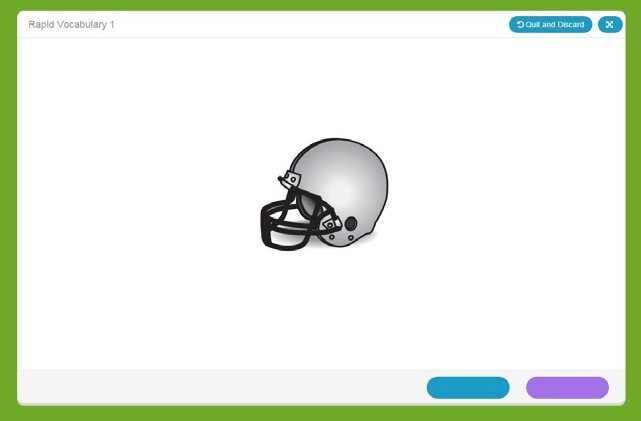
For the Rapid Letter Naming and Rapid Vocabulary Naming measures, the teacher cannot correct scoring errors. If a scoring error is made, the assessment must be invalidated. To invalidate an assessment, click the “Invalidate this Assessment” button on the results screen.
Once an assessment has been completed and you have clicked “Done” you will not be able to invalidate. On CLI Engage, only administrators have the ability to invalidate student assessment scores. Invalidating a student score will delete the record of a student’s assessment and enable the teacher to reassess the child. Scores must be invalidated per child, per measure. Invalidated scores cannot be retrieved, so score invalidation should be done with utmost caution. For assistance, please submit a help ticket.
Score invalidation examples:
- Teacher accidentally assessed the wrong child
- Teacher accidentally assessed a child in the wrong language
- Teacher accidentally assessed the wrong measure
- Teacher accidentally assessed a child outside the guidance from their IEP
Reporting & Family Engagement
CPM Reports on CLI Engage
A variety of reports are available after completing CPM measures to guide data-based decision-making and instructional planning. Reports available for teachers include:
- Class Completion Report
- Class Summary Report
- Class Growth Report
- Class Goal-Setting Report
- Student Report for Teachers
- Student Report for Parents
- Small Group Report (located under the “View Groups” tab)
Additional reports are available at the school and district level on CLI Engage to monitor and review completion and child growth, as well as ensure accurate state reporting.
Learn more about the various reports available for child progress monitoring:
Family Engagement Resources
CLI’s family engagement resources make the most of procedures you likely already have in place, such as progress monitoring, homework, parent-teacher conferences, and open houses. CLI advocates a new focus for these efforts: supporting families in better understanding children’s development and engaging in fun, developmentally appropriate activities that not only build skills but strengthen the bonds between family members.
Accommodations Guide for Special Populations
The following accommodations may be helpful for administration of CPM for children with disabilities. Please submit a help ticket to reach our education advisor team for additional assistance.
Help Center
The CLI Engage Help Center provides resources and services designed to help you! Search for step-by-step guides and contact our support team.
- Talk to our support team! Visit the Support Team Office Hours calendar to find a link to our web-based support sessions.
- Submit a Help Ticket to receive individual assistance from a member of our support team. Help Tickets are processed on weekdays in the order received between the hours of 7:00 AM – 6:00 PM Central Time.
- Review CPM frequently asked questions
This document was last modified on: September 4, 2026