The Circle Kindergarten Progress Monitoring (KPM) User Guide is a comprehensive guide that includes “need to know” information about the administration of KPM in kindergarten classrooms. Note: KPM was previously known as TX-KEA.
Visit the KPM Toolkit! This online toolkit has been curated to meet the needs of those working in kindergarten settings, and who support a variety of educators and leaders within their regions. This “one stop shop” offers kindergarten programs the ability to locate a variety of materials and resources, each tailored to support understanding and implementation of KPM.
From the dashboard, you can navigate everything on CLI Engage! After logging in, you will see a dashboard that includes links to:
View the Quick Start Guide to learn where to find all the tools and resources on the platform.
The Assessment Practice Area is located under the red banner, “Screening, Observation, and Assessment.”
In the assessment practice area, you can:
Comprehensive training for KPM is available in the Online Learning and Professional Development section of CLI Engage. Users can earn certificates for the completion of each course.
When logged in, access the courses directly here: KPM Self-Instructional Courses
This page allows you to:
There are several options for uploading data into CLI Engage to create accounts for teachers and other staff, as well as adding children into the system for progress monitoring. Your rosters may be uploaded on your behalf.
Find instructions and more information: Uploading Teacher and Student Data
The Circle Kindergarten Progress Monitoring System (KPM) is the result of a collaborative effort between the US Department of Education, the Texas Education Agency, and the Children’s Learning Institute (CLI) at UTHealth Houston to develop and validate a kindergarten entry assessment that can be reliably administered by kindergarten teachers in Texas at the beginning of the school year. KPM originally launched in August 2017 under the name Texas Kindergarten Entry Assessment (TX-KEA) and was later expanded by CLI to include additional administration waves. The original TX-KEA measures remain part of KPM’s beginning-of-year (BOY) assessment. Learn more about the research project to develop TX-KEA, now known as KPM, on CLI’s website.
It covers multiple domains to provide a holistic understanding of each student and better inform kindergarten teachers about the students in their classes, helping them to design differentiated instruction to meet students’ needs and share information with families. If you’re looking for something not answered in this user guide, review KPM frequently asked questions or contact our support team.
KPM provides multiple implementation options in English and Spanish:
KPM is a comprehensive assessment that can be used to evaluate many learning domains critical for academic success at kindergarten entry and throughout the kindergarten year. Additional details about each measure are available in the sections below. Follow guidance from your district or school leadership on the measures to be administered for your classroom.
The following table shows the KPM measures available in English in each wave, the type of response collected in the measure, and the administration time per student.
| Table 1. KPM English Measures | Response Type | BOY (Wave 1) | MOY (Wave 2) | EOY (Wave 3) |
| Vocabulary | Teacher-recorded | 1 min | 2 min | 1 min |
| Listening Comprehension | Student-selected | 2-3 min | 3 min | 3 min |
| Letter Names | Teacher-recorded | 1 min | 1 min | 1 min |
| Decoding | Teacher-recorded | 1-2 min | 2-3 min | 1-2 min |
| Letter Sounds-Receptive | Student-selected | 2 min | 1 min | 1 min |
| Letter Sounds-Expressive | Teacher-recorded | 1 min | 1 min | 1 min |
| Blending-Receptive | Student-selected | 4 min | 3-4 min | 1 min |
| Blending-Expressive | Teacher-recorded | 1 min | 1 min | 1 min |
| Spelling | Student-written | 5 min | 5 min | 5 min |
| Math, Part 1 | Teacher-recorded | 4-5 min | 1-2 min | 3-4 min |
| Math, Part 2 | Student-selected | 4-5 min | 1-2 min | 3-4 min |
| Science | Student-selected | 5 min | 5 min | 5 min |
| Social Emotional Competence | Behavior Checklist | 2-3 min | 3 min | 3 min |
| Emotion Management | Behavior Checklist | 2-3 min | ||
| Working Memory | Student-selected | 2-3 min | ||
| Inhibition | Student-selected | 2-3 min | ||
| Attention | Student-selected | 2 min | ||
| Academic Motor | Behavior Checklist | 3 min | ||
| Total Administration Time | Per Student | 44-52 min | 29-33 min | 29-32 min |
The following table shows the KPM measures available in Spanish in each wave, the type of response collected in the measure, and the administration time per student.
| Table 2. KPM Spanish Measures | Response Type | BOY (Wave 1) | MOY (Wave 2) | EOY (Wave 3) |
| Vocabulario | Teacher-recorded | 1 min | 2 min | 1 min |
| Comprensión Auditiva | Student-selected | 2 min | 3 min | 4-5 min |
| Nombres de las Letras | Student-selected | 1 min | 1 min | 1 min |
| Decodificación | Teacher-recorded | 1-2 min | 1-2 min | 1-2 min |
| Sonidos de las Letras-Receptivo | Student-selected | 1 min | 2 min | 2 min |
| Sonidos de las Letras-Expresivo | Teacher-recorded | 1 min | 1 min | 1 min |
| Combinación de Sonidos-Receptivo | Student-selected | 2 min | 2 min | 2 min |
| Combinación de Sonidos-Expresivo | Teacher-recorded | 2 min | 2 min | 2 min |
| Ortografía | Student-written | 5 min | 5 min | 5 min |
| Matemáticas, Parte 1 | Teacher-recorded | 4-5 min | 1-2 min | 3-4 min |
| Matemáticas, Parte 1 | Student-selected | 4-5 min | 1-2 min | 3-4 min |
| Ciencias | Student-selected | 5 min | 5 min | 5 min |
| Socioemocional | Behavior Checklist | 2-3 min | 3 min | 3 min |
| Manejo de Emociones | Behavior Checklist | 2-3 min | ||
| Memoria | Student-selected | 2-3 min | ||
| Inhibición | Student-selected | 2-3 min | ||
| Atención | Student-selected | 2 min | ||
| Motricidad Académica | Behavior Checklist | 3 min | ||
| Total Administration Time | Per Student | 42-49 min | 29-32 min | 33-37 min |
Learn about how the KPM measures are aligned to the Texas Essential Knowledge and Skills (TEKS):
KPM is a user-friendly and psychometrically sound screening and progress monitoring tool developed by the Children’s Learning Institute (CLI) at The University of Texas Health Science Center at Houston (UTHealth Houston). KPM is a standardized, criterion-referenced measure that relates well to established standardized tests and is sensitive to growth in student skills over time.
KPM tracks student progress throughout the kindergarten year, ensuring comprehensive monitoring across all timepoints. This provides a thorough overview of students’ academic and developmental growth, helping educators tailor their approaches to support each student’s learning needs. Additionally, the integration of screeners in the same assessment allows educators to identify and address specific areas where students may require additional support.
For detailed information about its reliability and validity, please refer to the KPM Technical Manual, available upon request.
Benchmarks represent the minimum performance levels students are expected to reach at key points throughout the school year and provide an indication of skill development. The KPM Benchmark Table displays the benchmark cut scores for each Wave and can be used to help analyze student performance, monitor progress, and identify students who may benefit from additional instructional support.
Each progress monitoring measure generates its own score. Some measures, such as Math, include multiple sub-measures that are combined to create an overall measure score. KPM also provides total scores and composite scores, such as the Literacy Screener, which are calculated using specific scoring criteria. Keep in mind that if a required measure is missing, the associated total score or composite score will not be available.
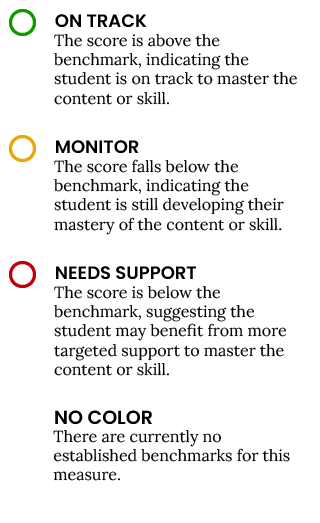
After a measure is administered, the student score is color-coded to indicate progress toward benchmark expectations.
KPM Benchmark Legend on CLI Engage

KPM includes two screeners developed to meet TEA requirements:
The state-mandated KPM Literacy Screener is comprised of the Vocabulary, Letter Names, and Spelling measures, administered at Wave 1 (BOY). After teachers administer all three measures, two composite scores are produced.
KEA Literacy Screening Score
Students will score within the “On Track” (green), “Monitor” (yellow) or “Support” (red) benchmarks ranges for each measure. These scores assist districts in informing student instruction. The composite score produced can be used to identify students who meet the “Support” benchmark because they are in the bottom 25th percentile.
Statewide Kindergarten Readiness Score: Reported to TEA
The Statewide Kindergarten Readiness score is also comprised of Vocabulary, Letter Names, and Spelling measures, administered at Wave 1 (BOY). Students must meet the “On Track” (green) benchmark for all three measures to meet the kindergarten readiness criteria determined by TEA. Districts can use these measures to make individual determinations regarding students who may require additional support.
CLI Engage offers two tools to support dyslexia screening for kindergarten students in English and Spanish, administered at Wave 3 (EOY). These tools can be used together to identify students who may be at risk of dyslexia.
The Dyslexia Screener is a direct assessment that aligns with the student skill criteria for dyslexia screening in accordance with Texas Education Code §28.006 and §38.003(a). The kindergarten Dyslexia Screener on CLI Engage uses the following measures to assess skills identified in TEA’s Dyslexia Handbook.
English
Spanish
The Dyslexia Referral Checklist (DRC) is a supplemental questionnaire that links direct assessment of early reading skills to classroom observations.
Teachers can use the DRC as an additional source of information to support dyslexia screening.
Understanding the Rating Levels
The following rating levels are used to describe children’s early literacy and reading skills:
Important: The Dyslexia Referral Checklist should be used as one source of information when considering whether additional evaluation may be needed. Checklist results should be reviewed alongside classroom performance, intervention data, screening results, and other relevant student information.
The KPM measures include a variety of response types that are administered with teacher input and/or supervision.
How should the teacher and student situate themselves?
How do you administer?
How is it scored?
How should the teacher and student situate themselves?
How do you administer?
How is it scored?

How do you administer?
How is it scored?
How do you administer?
How is it scored?
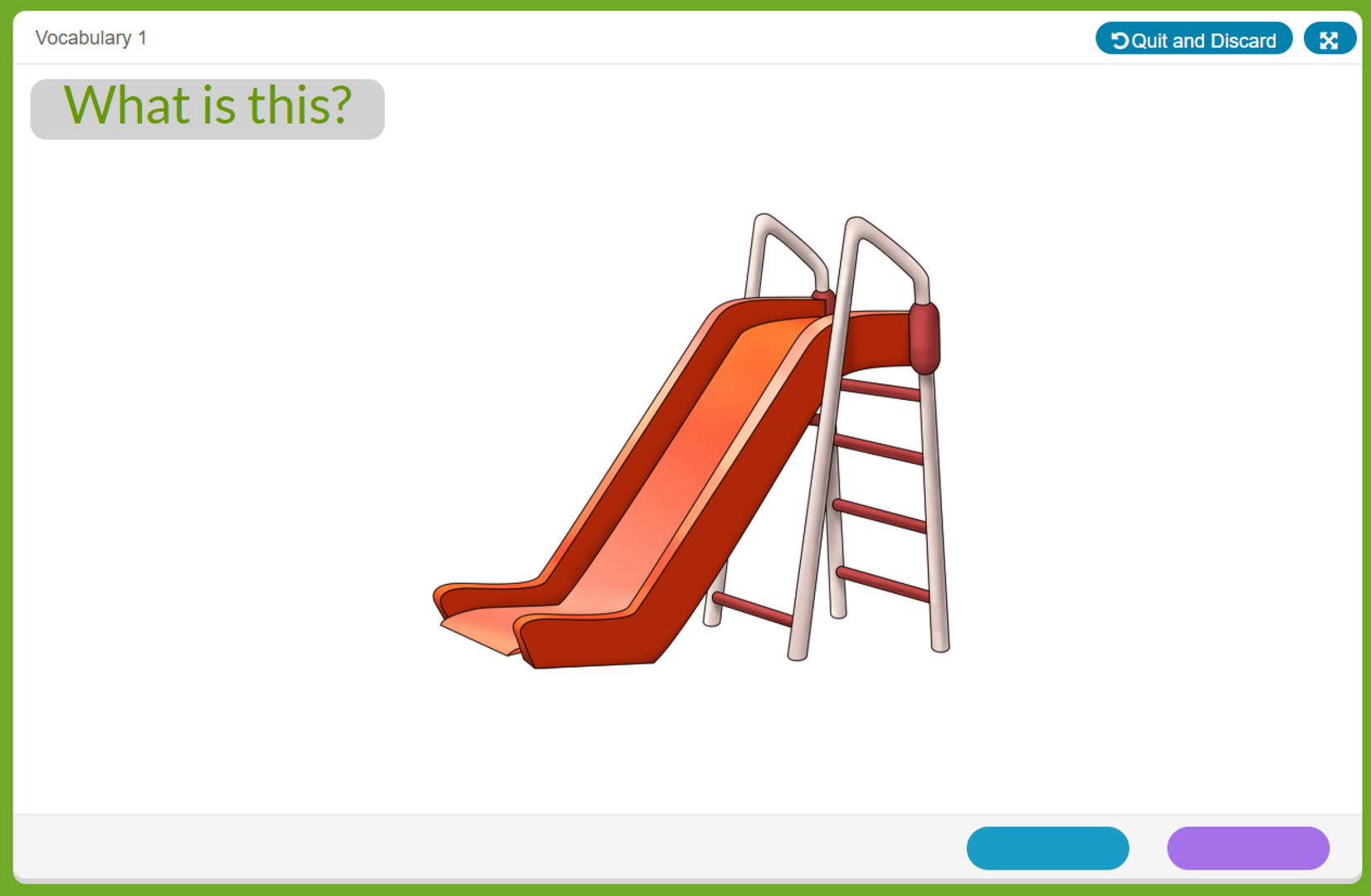
Vocabulary is a foundational language skill that supports learning across all content areas. Understanding a student’s vocabulary knowledge helps teachers adjust instruction and language use to better support individual learning needs. This measure is available in both English and Spanish.
Vocabulary Features
Administration Directions
Allowable Prompts
In some situations, a student’s response may require clarification before scoring. The following prompts may be used when appropriate:
Prompting Guidelines
Important: Use prompts only to clarify student responses. Do not use prompts to coach, cue, or lead students to the correct answer.
Listening comprehension is a foundational language skill that supports learning in all content areas. KPM assesses the student’s ability to understand verbal information and follow directions.
Listening Comprehension Features
Administration Directions:
Important: Although this is a self-guided measure, teachers should monitor students to ensure they wait until the images change from grayscale to color before making their selections.
Allowable Prompts
Use the following prompts only when necessary:
Note: If a student does not respond after an extended period of time, the item will be scored as incorrect, and CLI Engage will automatically advance to the next item.
Letter Names assesses students’ knowledge of the names associated with letters of the alphabet. Knowledge of letter names is an important component of letter knowledge and is a strong predictor of later reading achievement. This measure is available in both English and Spanish.
Letter Names Features
Letter Names Directions
Directions will be provided on the screen.
English Administration
Spanish Administration
Decoding assesses a student’s ability to read unfamiliar words by applying letter-sound knowledge rather than relying on memorization. This skill reflects a student’s ability to blend sounds together to read words accurately.
Decoding Features
Decoding Directions
The teacher and student should sit side-by-side during administration.
Say:
“I am going to show you some words and I would like you to try to read them to me. What word is this?”
Example
After the first item, the prompt may be shortened to:
“What word is this?”
If the student reads the word sound-by-sound (for example, /h/ /o/ /t/), prompt the student by saying:
“Now say the word smoothly.”
This prompt may be used each time the student attempts to read a word by sounding out the individual letters.
Scoring Guidance
Important: Credit should only be given when the student successfully blends the sounds and reads the complete word accurately.
There are two measures that assess students’ knowledge of letter sounds: Letter Sounds-Receptive and Letter Sounds-Expressive. To gain the most complete understanding of a student’s early literacy development and support instructional planning, educators are encouraged to assess both letter names and letter sounds. Letter knowledge at kindergarten entry is a strong predictor of literacy achievement. These measures are available in both English and Spanish.
Letter Sounds-Receptive Features
In the Letter Sounds-Receptive measure, the student hears a letter sound and identifies the corresponding printed letter.
Letter Sounds-Receptive Directions
Directions will be provided on the screen.
Allowable Prompts for Letter Sounds-Receptive
If the student does not respond within 10 seconds:
If the student says, “I don’t know,” shrugs, or does not initiate a response:
If the student selects multiple letters:
Score the item as incorrect by selecting an incorrect letter on the screen. The computer will automatically advance to the next item.
Important: Allowable prompts are intended to encourage a response and should not be used to help the student identify the correct answer.
There are two measures that assess students’ knowledge of letter sounds: Letter Sounds-Receptive and Letter Sounds-Expressive. To gain the most complete understanding of a student’s early literacy development and support instructional planning, educators are encouraged to assess both letter names and letter sounds. Letter knowledge at kindergarten entry is a strong predictor of literacy achievement. These measures are available in both English and Spanish.
Letter Sounds-Expressive Features
In the Letter Sounds-Expressive measure, a letter is displayed on the screen, and the student provides the corresponding sound.
Letter Sounds-Expressive Directions
This measure assesses the student’s knowledge of letter sounds. The teacher and student should sit side by side during administration.
Say:
“We are going to look at some letters and see if you know the sound they make. It is OK to guess if you do not know the sounds. Some letters make only one sound, and some make more than one sound. Try to tell me at least one sound the letters make. Ready?”
Present each letter and record the students’ response.
If the student says the name of the letter instead of the sound, say:
“Tell me the sound.”
There are two blending measures that assess students’ phonological awareness, or sensitivity to the sound structure of oral language: Blending-Receptive and Blending-Expressive. Phonological awareness is essential for learning to read and write and is a strong predictor of literacy achievement. These measures are available in both English and Spanish.
Blending-Receptive Features
Blending-Receptive Directions
Directions will be provided on the screen.
Allowable Prompts for Blending-Receptive
If the student does not respond within 10 seconds:
If the student points to multiple images:
If the student says the word but does not point to a picture:
Important: Allowable prompts are intended to encourage a response and clarify student actions. Prompts should not be used to help the student identify the correct answer.
There are two Blending measures that assess students’ phonological awareness, or sensitivity to the sound structure of oral language: Blending-Receptive and Blending-Expressive. Phonological awareness is necessary for learning to read and write and is predictive of literacy achievement. These measures are available in English and Spanish.
Blending-Expressive Features
Allowable Prompts for Blending-Expressive
Spelling assesses students’ early spelling abilities, including their ability to apply sound-symbol relationships when writing words. KPM includes spelling because it is strongly related to later literacy achievement. Attempting to spell words requires students to apply multiple literacy skills simultaneously, including alphabet knowledge and phonological awareness. Different items are administered during each Wave of the measure.
All materials can be downloaded from the KPM Scoring Guidelines page.
Spelling Features
Required Materials
Download the following materials from the KPM Scoring Guidelines page:
Administration Directions
Use the Teacher Script for administration instructions. The Teacher Script can be downloaded from the KPM Scoring Guidelines page on CLI Engage.
Allowable Prompts (English Administration)
If a student appears finished or pauses for 10-15 seconds without putting the pencil down:
If a student says, “I don’t know,” or does not understand the task:
If a student is scribbling within the writing line:
If a student writes outside the line:
Important: Allowable prompts are intended to support task completion and should not provide assistance with spelling the word or identifying the correct response.
There are two Mathematics measures: Math, Part 1 and Math, Part 2. Both measures must be completed to calculate a student’s overall Mathematics score.
A strong foundation in mathematics during early childhood supports later math achievement. Through informal and formal learning experiences, students develop skills in problem-solving, number sense, operations, patterning, and applying mathematics in everyday situations. The mathematics measures assess these foundational skills.
Mathematics Features
Math, Part 1
This measure assesses students’ knowledge of numbers and counting, operations, patterns, and real-world mathematics through teacher-recorded responses.
Math, Part 2
This measure assesses students’ knowledge of number recognition, patterns, and operations and may be completed independently with adult supervision.
Mathematics Directions
Directions will be provided on the screen.
Allowable Prompts for Mathematics
There may be rare occasions when a student’s response requires follow-up prompting.
Counting Aloud Item
Special Scoring Instructions for Mathematics
For cardinality items, the student’s final answer is the response that should be scored. The counting sequence itself is not scored.
Correct Responses
A response is scored as correct when the student provides the correct cardinal value, even if the counting sequence was inaccurate.
Example 1
Example 2
Incorrect Responses
A response is scored as incorrect if the student:
Example
The Science measure includes science and engineering concepts and assesses students’ knowledge of physical, life, earth, and space sciences, as well as engineering applications of science. Science instruction builds on students’ natural curiosity about the world and supports predictive thinking, causal reasoning, and reflection on systems and models. This measure is available in both English and Spanish.
Science Features
Science Directions
Directions will be provided on the screen.
Allowable Prompts for Science
If the student does not respond after 10 seconds:
Important: Allowable prompts are intended to encourage participation and should not be used to provide clues or help the student identify the correct answer.
Social Emotional Competence focuses on students’ social and emotional skills within a classroom setting. This measure evaluates students’ prosocial skills, approaches to learning, and understanding of emotions.
Social Emotional Competence Features
Social Emotional Competence Directions
Directions will be provided on the screen.
Scoring Social Emotional Competence
Use the Social Emotional Competence Scoring Guidelines, available on CLI Engage, to support scoring and enter ratings online.
This measure is completed through ongoing classroom observations. We recommend completing the checklist after students have adjusted to kindergarten and you have had sufficient opportunities to observe their interactions with peers and adults.
When selecting a rating, consider the student’s typical behavior across classroom activities and routines.
Rating Definitions
Scoring Instructions
For each item, select the rating that best reflects the student’s typical behavior:
Important: Consider the student’s behavior across multiple observations and settings rather than relying on a single interaction or event.
Emotion Management focuses on students’ ability to manage their emotions and respond appropriately to emotional experiences. This measure evaluates how well students adapt to the expectations and demands of the classroom and school environment. This measure is available in both English and Spanish.
Emotion Management Features
Emotion Management Directions
Directions will be provided on the screen.
Scoring Emotion Management
Students are assessed using an observation checklist completed through ongoing observations of classroom interactions. Teachers record whether the student’s behavior occurs rarely, sometimes, or consistently.
We recommend completing the checklist after students have adjusted to kindergarten and you have had sufficient opportunities to observe their interactions with peers and adults.
When selecting a rating, consider the student’s typical behavior across classroom activities and routines.
Rating Definitions
Scoring Instructions
For each item, select the rating that best reflects the student’s typical behavior:
Important: Consider the student’s behavior across multiple observations and settings rather than relying on a single interaction or event.
The Executive Function domain addresses the cognitive skills students use to plan, problem-solve, and follow classroom rules. We focus on three executive functioning skills – Inhibition, Working Memory, and Attention. These skills help students manage their own learning and behavior in the classroom.
Students are assessed on their ability to hold in memory 1–3 pieces of information in an increasingly complex setting. Students recall where cars are parked in a garage. The number of cars and the number of parking spaces increase as the student progresses. This measure is available in English and Spanish.
Working Memory Features
Working Memory Directions
Directions will be provided on the screen.
Allowable Prompts for Working Memory
Allow 10 seconds for the student to respond before providing a prompt. The student can be prompted one time. If the student does not reply with the correct answer within 10 seconds after the appropriate follow-up statement is provided once, then the item is scored as incorrect.
Students are asked to respond accurately to a specific stimulus (e.g., butterfly), and withhold, or inhibit, a response to a different stimulus (e.g., bee). This task involves students catching butterflies in a butterfly net but NOT catching bees for a certain time limit. They are warned that the butterflies are fast and that the students must be fast too. Scores reflect the student’s ability to respond accurately while inhibiting a response. This measure is available in English and Spanish.
Inhibition Features
Inhibition Directions
Directions will be provided on the screen.
Allowable Prompts for Inhibition
Allow 10 seconds for the student to respond before providing a prompt. The student can be prompted one time. If the student does not reply with the correct answer within 10 seconds after the appropriate follow-up statement is provided once, then the item is scored as incorrect.
Attention assesses a student’s ability to focus, stay on task, and quickly and accurately identify relevant features of a task. During this measure, students have 2 minutes to make as many correct matches as possible between a target flower and one of five response choices. This measure is available in both English and Spanish.
Attention Features
Attention Directions
Directions will be provided on the screen.
Allowable Prompts for Attention
If the student does not respond after 10 seconds:
Important: Allowable prompts are intended to encourage participation and should not provide clues or assistance that could influence the student’s response.
Academic Motor Skills assesses a variety of motor skills that support successful participation in school activities. Motor skills play an important role in how young children learn and contribute to both cognitive and social development. This measure is available in both English and Spanish.
Academic Motor Skills Features
Academic Motor Skills Directions
Directions will be provided on the screen.
Scoring Academic Motor Skills
Use the Academic Motor Skills Scoring Guidelines available on CLI Engage to support scoring and enter ratings into KPM.
Students are assessed using an observation checklist completed through ongoing observations of motor behaviors. Teachers record whether each skill is:
We recommend completing the checklist after students have adjusted to kindergarten and you have had sufficient opportunities to observe their motor skills in a variety of settings and activities.
Rating Definitions
Not Observed
The teacher has not yet observed the student demonstrating the skill. Because KPM is typically administered approximately one month after school entry, this rating should be used sparingly. Teachers should have opportunities to observe many of these skills during classroom activities, small-group instruction, playground time, and measures such as Spelling. If a skill has not been observed naturally, teachers may create opportunities for observation through classroom tasks.
Delayed
The student’s motor skill development appears significantly below that of most kindergarten peers. This rating should be used when the student’s performance is clearly outside the expected developmental range.
For example:
Typical for Age
The student’s motor skills are developmentally appropriate and similar to those demonstrated by most kindergarten students.
Scoring Instructions
For each item, select the rating that best reflects the student’s typical motor behavior:
Important: Ratings should be based on multiple observations across activities and settings whenever possible, rather than a single observation or isolated event.
The Spanish and English versions of KPM have been evaluated to ensure their reliability and validity with Spanish-speaking and emergent bilingual populations.
The decision to assess Spanish-speaking students in Spanish, or in both English and Spanish, should follow the recommendations of the campus Language Proficiency Assessment Committee (LPAC). Decisions on the language of assessment for native English speakers who are participating in Spanish-English dual-language immersion programs is left to the discretion of program personnel.
KPM allows you the flexibility to assess students in one or both languages. Students can be assessed in both English and Spanish for individual measures.
To help guide instructional planning, a teacher may wish to learn more about a student’s performance in Spanish even if the student is receiving all English instruction.
For example:
There may be instances when you find it helpful to administer specific sub-measures in a student’s most proficient language.
Linguistic accommodations are those that reduce the English proficiency demands of the test without altering the construct the test is intended to measure.
KPM is exclusively administered on the CLI Engage platform. KPM is intended to be administered by the classroom teacher, or someone with familiarity with the students in the classroom. Remember that students will vary in terms of their familiarity and comfort with assessments. Have this User Guide accessible in advance. Keep it with you so that you can refer to each measure section throughout administration, as needed.
The following devices are recommended for administration:
CLI Engage allows you to set your own assessment schedules; this is a local leadership decision. We normally suggest that beginning-of-year (Wave 1 on CLI Engage) assessments be conducted starting in mid-September and ending by mid-October. Middle-of-year (Wave 2) may be around mid-January to mid-February. Administration at the end-of-year (Wave 3) can be around mid-April to mid-May. You can also determine which of the available measures, beyond the required measures, may be more useful to meet your instructional objectives.
Assessment Windows Lock Feature
The optional “lock” feature allows LEAs to limit access to specific administration windows for teachers. Administrators can set testing dates for assessments and waves. This feature ensures that teachers conduct assessments during the correct waves and within designated testing windows. Learn more about this tool here: Assessment Lock Feature How-to Guide
Utilize CLI’s resources for alternative administration functionality and protocols for KPM. Visit our detailed webpage to access teacher’s guides, webinars, and visual schedules to support teachers as they administer assessments remotely: Remote Assessment Administration
The offline assessment feature can be used to assess students when an internet connection is not available at the time of administration. The offline feature for KPM can be accessed from the assessment practice area (for practicing the offline feature) or directly from the class view in KPM (when conducting the assessments): KPM Offline Assessment
The Exclude button is used to “exclude” a student OR the entire class from a specific measure. The completion report takes this exclusion into account when tabulating completion rates. For example, in a class of 10 students, if 2 are excluded and the remaining 8 are measured, the completion report will indicate 100%. If the students are not formally excluded using this feature, the report would indicate an 80% completion rate. Anyone with access to a class can exclude measures.
If all students are excluded from a measure (i.e., the measure is not being administered to any student), it is more efficient to use the Exclude All button that appears just below the measure name, rather than excluding each individual child. This feature excludes the entire class from a measure with one click. In this case, the “Launch” icon is replaced by a gray square preventing the measure from being administered to the student. This can also be done by an administrator, but would have to be set for every class (i.e., it cannot be performed school-wide). In this case, the teacher would not see the measures that the administrator had excluded.
If a teacher excludes all students from a measure, it is helpful to also remove it from view using the Hide/Display Measures feature. This makes it easier to locate measures you are actually assessing without having to scroll through the full list of available measures. It is important to note that the “Hide/Display Measures” button hides a measure from view for navigational purposes only. Hiding a measure does not affect data or reporting. Hiding is set by each user, and the system remembers the user’s preference; therefore, no user can hide measures for another user.
The teacher will indicate a child’s correct or incorrect response for each item by clicking the buttons on screen or using the keyboard arrow keys:

If a scoring error is made, the assessment must be invalidated. To invalidate an assessment, click the “Invalidate this Assessment” button on the results screen.
Once an assessment has been completed and you have clicked “Done” you will not be able to invalidate. On CLI Engage, only administrators have the ability to invalidate student assessment scores. Invalidating a student score will delete the record of a student’s assessment and enable the teacher to reassess the child. Scores must be invalidated per child, per measure. Invalidated scores cannot be retrieved, so score invalidation should be done with utmost caution. For assistance, please submit a help ticket.
Score invalidation examples:
For some direct assessments, the child may see a celebratory completion page after completing all items.
When finished, you may dismiss the child and click “Next” to see the results.
The teacher’s results screen includes:
A variety of reports are available after completing KPM measures to guide data-based decision-making and instructional planning. Reports available for teachers include:
Additional reports are available at the school and district level on CLI Engage to monitor and review completion and child growth, as well as ensure accurate state reporting.
Learn more about the various reports available for child progress monitoring:
CLI’s family engagement resources make the most of procedures you likely already have in place, such as progress monitoring, homework, parent-teacher conferences, and open houses. CLI advocates a new focus for these efforts: supporting families in better understanding children’s development and engaging in fun, developmentally appropriate activities that not only build skills but strengthen the bonds between family members.
The CLI Engage Family Engagement Toolkit make the most of procedures you likely already have in place, such as progress monitoring, homework, parent-teacher conferences, and open houses. CLI advocates a new focus for these efforts: supporting families in better understanding children’s development and engaging in fun, developmentally appropriate activities that not only build skills but strengthen the bonds between family members.
Teachers using KPM can share student reports with families by printing them or providing a PIN for online access. Teachers can also send families activities that are designed to support skill development at home.
Student Report Resources:
Implementation Guide (available in English and Spanish) includes the following topics:
Helping Families Understand Their Child’s Assessment Results:
Teachers can collect valuable information on their student’s development by sharing these forms with families and asking them to give feedback about their child. Each form is aligned to the KPM measures to support the integration of family information into instructional planning. Family Observation Forms are available in English and Spanish.
Many studies have shown that families and teachers working together to support children’s development can lead to better outcomes for children. This collection includes fun, easy activity ideas that families can do together to help support important school readiness skills for children ages 0-6. Learn more here: Circle Activity Collection: Family
Teachers can also share family activities directly with families via email throughout the school year. This feature is accessed through your class small group report for KPM. After uploading parent email addresses, teachers can select and share activities aligned to each child’s areas for skill development so children are supported at school and home.
Multiple sources were used to determine the best recommendations to accommodate KPM for use with students with disabilities. This included a review of the Texas Education Agency’s published accommodations recommendations and federal sources that provide considerations and accommodations for students with disabilities. Feedback was collected from special educators, diagnosticians, and other district professionals, such as speech, occupational, and physical therapists. Based on feedback from these professionals, attempts were made to build an assessment system that could be used with a broad range of students with varying disabilities.
When making a determination about whether or not KPM is appropriate for a student with a disability, consider the following factors:
Students with disabilities have a wide range of skills, and many students with mild forms of disabilities, such as a language delay, can easily complete many of the KPM measures with no or minimal accommodation.
Understanding how a student with a disability scores relative to typically developing peers can provide teachers with information to share with parents about the relative strengths and weaknesses of students with disabilities. For example, you may have a student with a language delay who scores within normal limits on the Math and Self-Regulation measures but struggles on measures assessing phonological awareness. This provides a wide range of information about these students’ strengths and areas for growth.
TEA provides detailed information on the provision of accommodation for state assessments on its website. Even though KPM is not a mandated state assessment, TEA guidelines should be used to determine which accommodations can be provided for KPM. Please see the Accommodations Resources section on the TEA website.
KPM provides two classes of recommendations within the TEA model: Low Risk and High Risk.
Low Risk Decision Rule: Accommodations that DO NOT alter or change the wording, scoring criteria, or time limits imposed on certain KPM measures are considered low risk and easily approved and implemented by ARD or 504 committee. Many TEA accommodations are appropriate for KPM measures with low risk to the integrity of the assessment. Examples of Low Risk accommodations are provided below.
High Risk Decision Rule: Accommodations that DO alter or change the wording, scoring criteria, or time limits imposed on certain KPM measures are considered high risk. High Risk accommodations may impact the validity and integrity of the assessment making interpretation more challenging. High risk accommodations may be helpful when using KPM to evaluate a student’s relative strengths and weaknesses rather than using the scores to relate performance to the norm group. These would not be norm-based, but may provide meaningful information for teachers and professionals for students’ learning and educational planning.
While not technically an accommodation, it is hoped that good testing practices are utilized when teachers use KPM in a classroom. Establishment of rapport with young students is critical for KPM assessments.
Students should not be penalized for words that are poorly articulated. Kindergarteners often struggle articulating words clearly. A good rule of thumb is that if two adults could easily determine what word the student said then the verbal response should be scored.
Teachers and administrators should make reasonable efforts to provide appropriate accommodations that will allow students with disabilities the opportunity to demonstrate their knowledge. The best judges of the appropriateness of the accommodations are the professional staff who has the most contact with the student with a disability. Creative accommodation approaches that allow students with disabilities to successfully complete KPM measures but do not violate the content of the assessment would be welcomed by the authors of KPM. TEA Guidelines should be considered when attempting to determine appropriate accommodations.
The CLI Engage Help Center provides resources and services designed to help you! Search for step-by-step guides and contact our support team.
This document was last modified on: August 13, 2026