Circle KPM User Guide
The Circle Kindergarten Progress Monitoring (KPM) User Guide is a comprehensive guide that includes “need to know” information about the administration of KPM in kindergarten classrooms. Note: KPM was previously known as TX-KEA.
Visit the KPM Toolkit! This online toolkit has been curated to meet the needs of those working in kindergarten settings, and who support a variety of educators and leaders within their regions. This “one stop shop” offers kindergarten programs the ability to locate a variety of materials and resources, each tailored to support understanding and implementation of KPM.
Getting Started
KPM Overview
The Circle Kindergarten Progress Monitoring System (KPM) is the result of a collaborative effort between the US Department of Education, the Texas Education Agency, and the Children’s Learning Institute (CLI) at UTHealth Houston to develop and validate a kindergarten entry assessment that can be reliably administered by kindergarten teachers in Texas at the beginning of the school year. KPM originally launched in August 2017 under the name Texas Kindergarten Entry Assessment (TX-KEA) and was later expanded by CLI to include additional administration waves. The original TX-KEA measures remain part of KPM’s beginning-of-year (BOY) assessment. Learn more about the research project to develop TX-KEA, now known as KPM, on CLI’s website.
It covers multiple domains to provide a holistic understanding of each student and better inform kindergarten teachers about the students in their classes, helping them to design differentiated instruction to meet students’ needs and share information with families. If you’re looking for something not answered in this user guide, review KPM frequently asked questions or contact our support team.
KPM provides multiple implementation options in English and Spanish:
- Three-wave progress monitoring tool (BOY, MOY, EOY)
- One-time kindergarten entry assessment (BOY)
- One-time literacy screener (BOY)
- Dyslexia Screener (EOY)
KPM is a comprehensive assessment that can be used to evaluate many learning domains critical for academic success at kindergarten entry and throughout the kindergarten year. Additional details about each measure are available in the sections below. Follow guidance from your district or school leadership on the measures to be administered for your classroom.
Benchmarks
Benchmarks represent the minimum performance levels students are expected to reach at key points throughout the school year and provide an indication of skill development. The KPM Benchmark Table displays the benchmark cut scores for each Wave and can be used to help analyze student performance, monitor progress, and identify students who may benefit from additional instructional support.
Each progress monitoring measure generates its own score. Some measures, such as Math, include multiple sub-measures that are combined to create an overall measure score. KPM also provides total scores and composite scores, such as the Literacy Screener, which are calculated using specific scoring criteria. Keep in mind that if a required measure is missing, the associated total score or composite score will not be available.
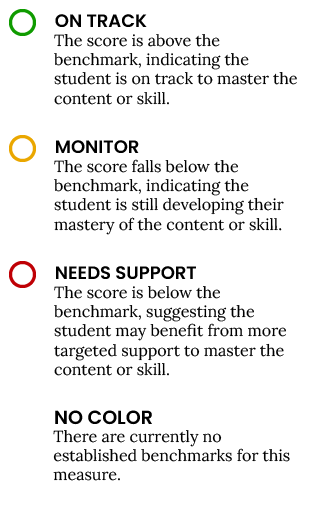
After a measure is administered, the student score is color-coded to indicate progress toward benchmark expectations.
- On Track: Student performance meets or exceeds benchmark expectations.
- Monitor: Student performance is approaching benchmark expectations and may benefit from additional support.
- Support: Student performance is below benchmark expectations and may require targeted intervention.
- No Color: No benchmark has been established for the measure.
KPM Benchmark Legend on CLI Engage
KPM State Screeners
KPM includes two screeners developed to meet TEA requirements:
- Literacy screener, administered at BOY (Wave 1)
- Dyslexia screener, administered at EOY (Wave 3)
Item Response Types
The KPM measures include a variety of response types that are administered with teacher input and/or supervision.
How should the teacher and student situate themselves?
- You can sit side-by-side.
- You can sit adjacent to each other.
How do you administer?
- Student must wear headphones.
- Prompts will either be audio prompts given by the test or teacher prompts read from the screen.
- Have student listen to the audio prompt or your teacher prompt and verbalize their response.
How is it scored?
- CLI Engage scores each item.
- For some teacher-recorded response items, the teacher will indicate whether the student response was correct or incorrect by clicking a colored button.
- Incorrect student response: blue button, or press the left arrow on the keyboard
- Correct student response: Click the purple button or press the right arrow on the keyboard. “Right is right!”

Language and Literacy Measures
Language Domain
Literacy Domain
Science, Technology, Engineering, and Math Measures
Executive Function Measures
The Executive Function domain addresses the cognitive skills students use to plan, problem-solve, and follow classroom rules. We focus on three executive functioning skills – Inhibition, Working Memory, and Attention. These skills help students manage their own learning and behavior in the classroom.
Academic Motor Skills Measure
Selecting Language of Administration
The Spanish and English versions of KPM have been evaluated to ensure their reliability and validity with Spanish-speaking and emergent bilingual populations.
Administration and Scoring Guidelines
KPM is exclusively administered on the CLI Engage platform. KPM is intended to be administered by the classroom teacher, or someone with familiarity with the students in the classroom. Remember that students will vary in terms of their familiarity and comfort with assessments. Have this User Guide accessible in advance. Keep it with you so that you can refer to each measure section throughout administration, as needed.
The following devices are recommended for administration:
- Computer/laptop with Windows operating system.
- Tablet screen size must be larger than 8″ x 5″ (iPads not recommended for use because of known audio issues)
- Headphones
- Other Materials:
- Pencils and erasers for the Spelling measure (for students)
- KPM Scoring Guidelines – printed
The teacher will indicate a child’s correct or incorrect response for each item by clicking the buttons on screen or using the keyboard arrow keys:
- Click the blue button or your keyboard’s left arrow if the student gave the incorrect response.
- Click the purple button or your keyboard’s right arrow if the student gave the correct response.
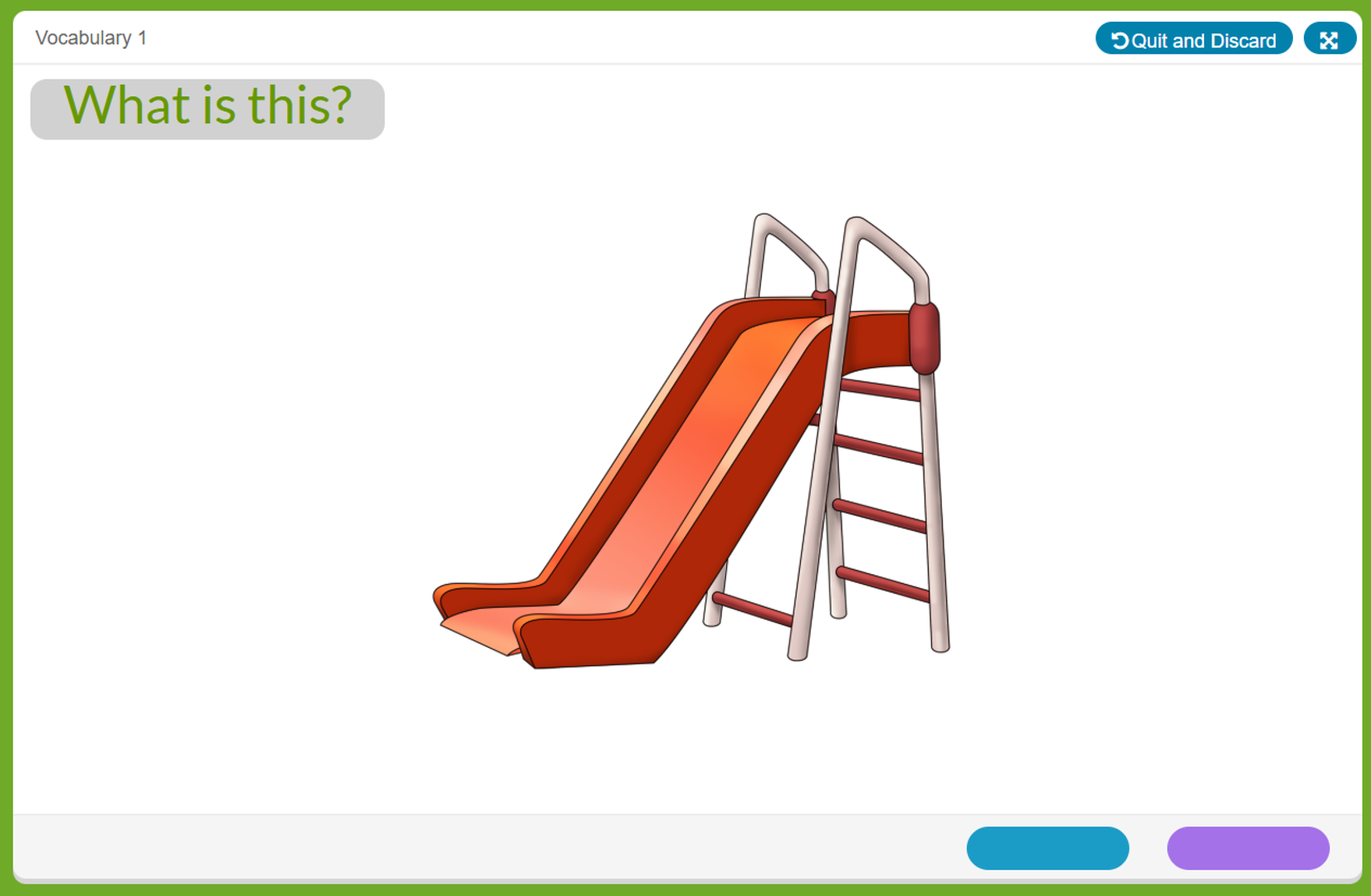
If a scoring error is made, the assessment must be invalidated. To invalidate an assessment, click the “Invalidate this Assessment” button on the results screen.
Once an assessment has been completed and you have clicked “Done” you will not be able to invalidate. On CLI Engage, only administrators have the ability to invalidate student assessment scores. Invalidating a student score will delete the record of a student’s assessment and enable the teacher to reassess the child. Scores must be invalidated per child, per measure. Invalidated scores cannot be retrieved, so score invalidation should be done with utmost caution. For assistance, please submit a help ticket.
Score invalidation examples:
- Teacher accidentally assessed the wrong child
- Teacher accidentally assessed a child in the wrong language
- Teacher accidentally assessed the wrong measure
- Teacher accidentally assessed a child outside the guidance from their IEP
Reporting and Family Engagement
KPM Reports on CLI Engage
A variety of reports are available after completing KPM measures to guide data-based decision-making and instructional planning. Reports available for teachers include:
- Class Completion Report
- Class Summary Report
- Class Growth Report
- Class Goal-Setting Report
- Student Report for Teachers
- Student Report for Parents
- Small Group Report (located under the “View Groups” tab)
Additional reports are available at the school and district level on CLI Engage to monitor and review completion and child growth, as well as ensure accurate state reporting.
Learn more about the various reports available for child progress monitoring:
Family Engagement Resources
CLI’s family engagement resources make the most of procedures you likely already have in place, such as progress monitoring, homework, parent-teacher conferences, and open houses. CLI advocates a new focus for these efforts: supporting families in better understanding children’s development and engaging in fun, developmentally appropriate activities that not only build skills but strengthen the bonds between family members.
Assessing Students with Disabilities
Multiple sources were used to determine the best recommendations to accommodate KPM for use with students with disabilities. This included a review of the Texas Education Agency’s published accommodations recommendations and federal sources that provide considerations and accommodations for students with disabilities. Feedback was collected from special educators, diagnosticians, and other district professionals, such as speech, occupational, and physical therapists. Based on feedback from these professionals, attempts were made to build an assessment system that could be used with a broad range of students with varying disabilities.
When making a determination about whether or not KPM is appropriate for a student with a disability, consider the following factors:
- KPM was NOT designed and should NOT be used to identify a student as having a disability.
- KPM was not normed for students with disabilities. This means that we do not have normative information about how students with a particular disability would perform on these measures that could be used for comparison when evaluating the performance of a student with a disability.
Help Center
The CLI Engage Help Center provides resources and services designed to help you! Search for step-by-step guides and contact our support team.
- Talk to our support team! Visit the Support Team Office Hours calendar to find a link to our web-based support sessions and phone support.
- Submit a Help Ticket to receive individual assistance from a member of our support team. Help Tickets are processed on weekdays in the order received between the hours of 7:00 AM – 6:00 PM Central Time.
- Review KPM frequently asked questions
This document was last modified on: November 12, 2026

Social Emotional Measures
Social Emotional Competence focuses on students’ social and emotional skills within a classroom setting. This measure evaluates students’ prosocial skills, approaches to learning, and understanding of emotions.
Social Emotional Competence Features
Social Emotional Competence Directions
Directions will be provided on the screen.
Scoring Social Emotional Competence
Use the Social Emotional Competence Scoring Guidelines, available on CLI Engage, to support scoring and enter ratings online.
This measure is completed through ongoing classroom observations. We recommend completing the checklist after students have adjusted to kindergarten and you have had sufficient opportunities to observe their interactions with peers and adults.
When selecting a rating, consider the student’s typical behavior across classroom activities and routines.
Rating Definitions
Scoring Instructions
For each item, select the rating that best reflects the student’s typical behavior:
Important: Consider the student’s behavior across multiple observations and settings rather than relying on a single interaction or event.
Emotion Management focuses on students’ ability to manage their emotions and respond appropriately to emotional experiences. This measure evaluates how well students adapt to the expectations and demands of the classroom and school environment. This measure is available in both English and Spanish.
Emotion Management Features
Emotion Management Directions
Directions will be provided on the screen.
Scoring Emotion Management
Students are assessed using an observation checklist completed through ongoing observations of classroom interactions. Teachers record whether the student’s behavior occurs rarely, sometimes, or consistently.
We recommend completing the checklist after students have adjusted to kindergarten and you have had sufficient opportunities to observe their interactions with peers and adults.
When selecting a rating, consider the student’s typical behavior across classroom activities and routines.
Rating Definitions
Scoring Instructions
For each item, select the rating that best reflects the student’s typical behavior:
Important: Consider the student’s behavior across multiple observations and settings rather than relying on a single interaction or event.
Return to Top ↑